Does the MONOMOON moon fight anything?
No. It lights, reveals, and triggers. There are no combat encounters, and the moon is not an attack. Steering a creature with light is a puzzle use.

The MONOMOON moon (Steam app 3285880) is a tool you aim. The keyboard still walks, jumps, wall-jumps, and rolls. The mouse moves the moon, and the light around it is what wakes flowers, dark ground, and creatures.
A bloom that will not stay lit is a radius problem. A timed switch that dies when you leave is an attach problem. This page is that split. Door codes live on the puzzle page.
| Piece | What you do with it |
|---|---|
| Mouse | Aims the moon. The character does not follow the cursor. |
| Keyboard | Walk, jump, wall-jump, and roll while the moon stays where you parked it. |
| Light radius | Lights dark ground, flowers, creatures, and hidden marks inside the glow. |
| Attach | On at least one timed switch, the moon stays on the object after you walk away. |
| Controller | Works. Lower moon-cursor sensitivity. Mouse aim is still the better feel. |
| Combat | None. The moon does not hit, and you do not stand on it as a platform. |
Matched by build plan, shared topics, and guide progression — not random related links.
Treat the two inputs as two jobs. The keyboard moves the body. The mouse moves only the moon. This page does not publish a keymap. If you drag the mouse while you walk, you pull the light off the flower.
Stop the body first when a light has to be exact. Sweep the moon in a slow arc until the target sits inside the glow, then lift your hand off the mouse. A moving cursor is a moving radius. The flower, the mark, and the creature all read the glow, so a cursor that keeps drifting is the whole failure.
The moon is not a weapon, and early on it is not a platform you can jump onto. A guess that a later upgrade lets you stand on the moon is Unverified, and this page does not teach that route. Official play is exploration and puzzles, with no combat encounters. If a ledge looks one jump short, light the flowers on that wall or look for a roll use in the beginner guide before you invent a second jump.
Key names and the Steam Deck layout live on controls. The next section is what the glow itself changes once the cursor is still.
The useful part of the moon is the disk of light around it. Objects inside that disk react. Objects outside it stay dark, closed, or asleep. You do not have to click a flower for it to notice the moon — the radius is the input.
| Inside the radius | What changes |
|---|---|
| Dark ground | The floor and the walls become readable. Sweep before you jump a gap you cannot see. |
| Flower | The bloom reacts to moonlight. A lit row is what opens some wall-jump lines. |
| Creature | Some flee the light and can be steered. Some freeze or stare. Species names are Unverified. |
| Hidden mark | A mark that is blank in the dark can show up only while the glow covers it. |
| Water | The moon can be moved over water. The same light still counts there, including around the clam. |
Some wall-jump routes exist only while the flowers on that wall are lit. Light the row before you leave the ground. Park the center of the glow on each bloom you need, not the cursor tip on the pixel of the petal. If a bloom lights only while the mouse is moving, you are grazing the edge of the radius. Stop with the flower nearer the middle of the disk.
There is no published flower count and no named room for every wall-jump line. If the flowers are lit and the jump still fails, the missing piece is a movement use (often the roll, recorded in the Tome) or a different route, not a combat upgrade. Creature reactions that are not flowers belong on creatures.
In a dark room, including the animal well, sweep the moon before you decide the room is empty. The well animals are not given species names in the sources this site will quote. What is reliable is the light: it reveals, and it changes how a creature stands.
One first-hour creature runs from the moon. You can steer that flee onto a plate or off a ledge, then reset the room if you parked it wrong. Another reaction is the opposite: the creature stares or freezes in the light. Those are two uses of the same tool. Do not attack either of them. Names players invent for them, including any “mole” label, stay Unverified.
If the radius is doing its job and you still cannot tell a door from a softlock, use the fork in the next section, then the puzzles page.
Match the screen to one row, do that row, and stop. Two fixes at once (a new keybind plus a new route) hides which one worked.
| You see | Do this | Leave alone |
|---|---|---|
| Flower flickers or lights only while you wiggle the mouse | Lower sensitivity. Park the middle of the radius on the bloom and take your hand off the mouse. | Click-spam on the petal |
| Wall-jump looks one jump short | Light the flower row on that wall, then jump. | A search for a double-jump item |
| A timer dies the moment you run | Attach the moon to the switch and run. Confirm it is still there. | Assuming every object in the game is sticky |
| Pad cursor wobbles off the flower | Drop moon-cursor sensitivity, then repeat the same park. | Rebinding the character stick onto the moon |
| A creature blocks a ledge | Sweep light so it steps off or onto the plate. Reset if you overshoot. | An attack |
| A dark room with no prompt | Sweep the radius. Read any mark that appears only inside the glow. | A missing weapon |
| The map shows a small moon icon | That cursor is the swamp elevator clue, not a second moon you aim in the world. | Hunting a second moon upgrade |
The attach row and the sensitivity row are the two that feel like bugs and are not. Walk those next. The map-icon row is a puzzle, and the method (hover the top-center moon, read the digits that change along the bottom) is on puzzles, not here.
In the first hour, a timed switch can be held by the moon after you let go of the mouse and run. Park the light on the object, step away, and look back. If the moon is still on it, the timer is yours to spend on the character.
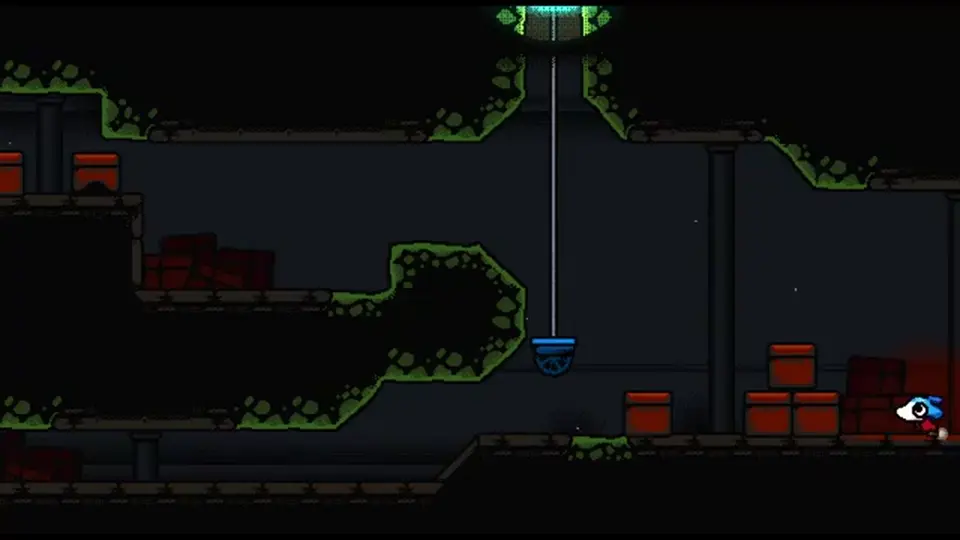
Use the attach when a clock kills the route the moment the light leaves. The working order is: stand where you can see the switch, place the moon, confirm the light is on the object, then run the character. Glance back once. If the moon dropped, that object does not hold it and you need a different clue — another flower, a plate, or a page in the Tome.
Do not treat “it stuck once” as a global rule. The verified case is that timed switch. Other objects may only react while the radius covers them, which sends you back to parking the cursor instead of running. Controller aim, if the park itself is shaky, is the last section.
Steam lists full controller support for MONOMOON. Keyboard and mouse is still the recommended feel, because the moon is a cursor. On a pad, the same cursor is a stick, and a stick at default sensitivity will not sit inside a flower.
Lower moon-cursor sensitivity until the glow can rest on a bloom without drifting off. There is no published “correct” percent. Drop it, park one flower, and only then retry the wall-jump. If the light is steady and the jump still fails, sensitivity was not the missing piece.
A separate controller note says the trigger may have to stay held or the moon drops out. That hold is Unverified. Test it once: if the moon vanishes when you release a shoulder button, hold the button and retest the flower before you rebind the whole pad. Binds, Deck performance from hotfix 1.0.08, and the rest of the layout are on controls.
The moon you just aimed is the same light the red doors, the swamp elevator, and the clam expect you to have already understood. Take one stuck board to puzzles and apply a method instead of a posted number.
Stand still. Move only the moon stick. The flower should light and stay lit while your thumb is off the stick. If it dies when your thumb comes off, sensitivity is still high or the trigger-hold note applies. If it stays lit and the route stays closed, go back to the fork table: you are on a clue, a roll, or an attach, not an aim setting.
Next: confirm the mouse is the moon on controls, then take a lit flower into a puzzle.
Flower creatures and the well animals: creatures. Dark wells and the right-side map: areas.
First-hour movement, including the roll: beginner guide.
No. It lights, reveals, and triggers. There are no combat encounters, and the moon is not an attack. Steering a creature with light is a puzzle use.
The bloom reads the light radius, not a click. Park the middle of the glow on it and stop moving the cursor. On a controller, lower moon-cursor sensitivity first. No exact slider value is published.
Not always. On a timed switch in the first hour it stays attached after you walk away. Test the object in front of you. A claim that every switch in the game sticks the same way is Unverified.
No. It is a cursor for the swamp elevator. Hover it at the top center and read the digits that change at the bottom. The method is on the puzzles page. Do not enter a code copied from somewhere else.
Not as a route this page will teach. Early on the moon is not a platform. A later “stand on the moon” idea is Unverified. Look for a lit flower row or a roll instead.
Matched by build plan, shared topics, and guide progression — not random related links.